

Visual Studio Code requires the C# Dev Kit extension to manage, run, and debug C# code.
Before installing the C# Dev Kit extension, please ensure the following software is installed in your environment:
-
.NET SDK 8.0 or later (LTS version recommended)
The following versions are used in this guide:
-
Visual Studio Code 1.109.0
-
.NET SDK 8.0.417
Follow the steps below to install the C# Dev Kit extension:
-
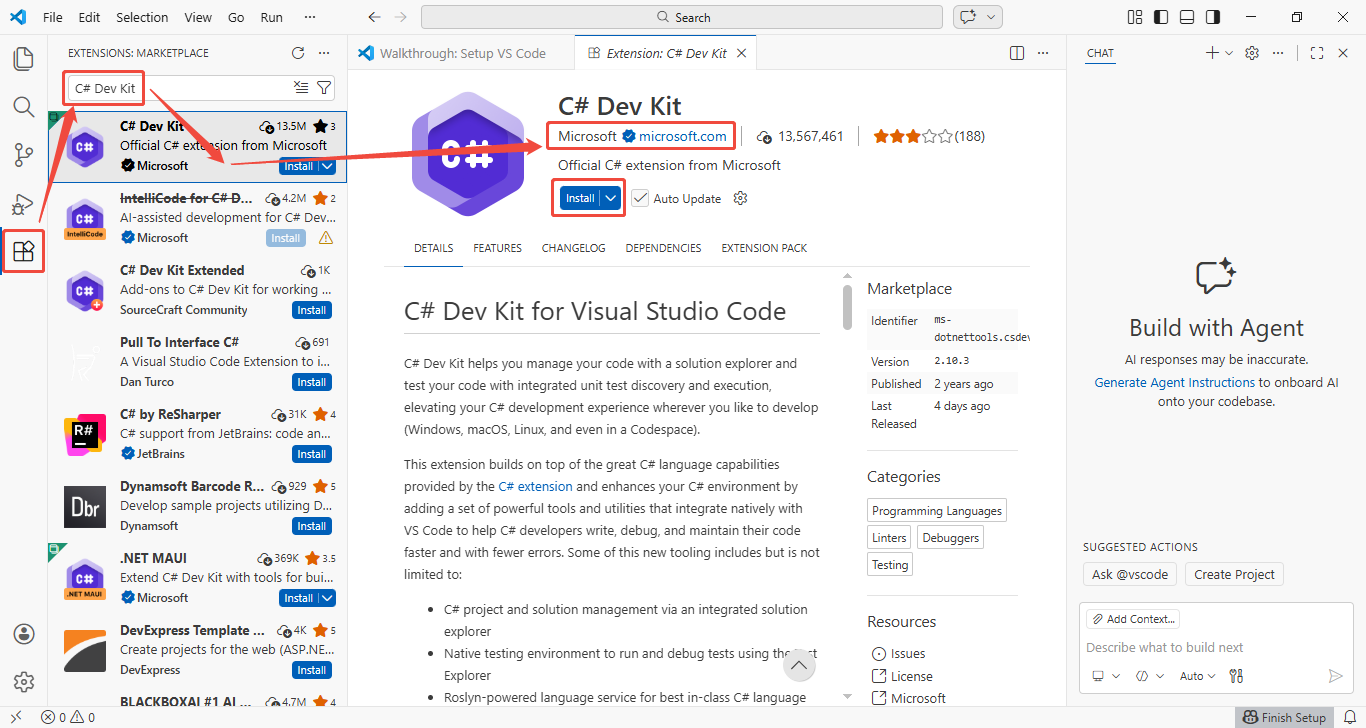
Launch Visual Studio Code, then click Extensions in the Activity Bar on the left to open the Extensions view.
-
Enter C# Dev Kit in the search box, and select the first item from the results list.
-
Verify that the publisher of the extension is Microsoft.
-
Click the Install button to begin the installation.
-
After the installation is complete, restart Visual Studio Code to activate the extension.
For more information, refer to: C# Dev Kit for Visual Studio Code | Microsoft Learn.
