

This chapter describes the architecture used by PowerServer and explains how it differs from the traditional PowerBuilder client/server model. Understanding these concepts will help you correctly configure, deploy, and troubleshoot your application.
Traditional PowerBuilder applications follow a two-tier client/server architecture. The client connects directly to the database using a persistent connection, and SQL statements are executed within the client process.
PowerServer introduces a middle-tier architecture. The client application communicates with server-side Web APIs, and all database operations are executed on the server.
Note
Database connectivity in PowerServer differs significantly from traditional client/server applications:
1) In PowerServer architecture, the client does not connect directly to the database.
2) All SQL execution is performed by the PowerServer Web API layer.
3) Database drivers are installed only on the server and are not required on client machines.
4) The database server is not exposed to clients. All communication is routed through the Web API layer.
| Item | Traditional Client/Server | PowerServer |
|---|---|---|
| Database access | Direct connection from client | Access through the middle tier (PowerServer Web APIs) |
| Database connection model | Long-running connection (remains open from CONNECT to DISCONNECT) | Short-lived connection (default) (automatically closed and returned to a pool after each transaction) |
| SQL execution | Executed in client | Executed on server |
| Database driver installation | Installed on each client | Installed on server only |
| Deployment model | EXE + DLL | Static files + Web APIs |
| Network communication | Database protocol | Standard REST/JSON over HTTP/HTTPS |
The PowerServer architecture improves security, simplifies client deployment, and enables modern hosting options such as containers and cloud platforms.
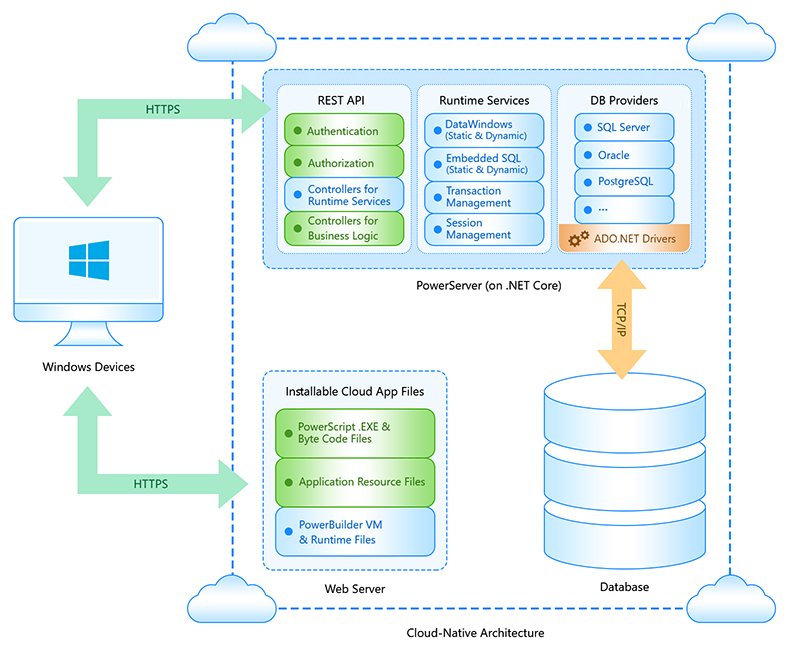
PowerServer separates application resources into static client files and dynamic server-side components. During deployment, traditional PowerBuilder PBD files are transformed into granular runtime units that support incremental updates.
Static resources are deployed to a web server or file server. The server acts only as a file host and does not execute business logic.
-
Cloud App Launcher
-
PowerBuilder runtime files
-
Granular P-code files (e.g., .dwo, .apl, .fun, .win, .udo)
-
Configuration files (e.g., apprun.json)
These files are downloaded to the client during the initial launch. Subsequent launches reuse locally cached files and download only updated resources.
Note
The application is initially installed via an app URL accessed through a web browser. Once installed, it no longer depends on the browser (type, version, or settings) and will run locally using the PowerBuilder runtime environment. It is a desktop application that communicates with server-side APIs.
Instead of deploying a monolithic PBD file, PowerBuilder compiles the application into smaller P-code units:
-
.dwo files (DataWindow objects)
-
.apl files (application objects)
-
.fun files (functions)
-
JSON metadata files
-
etc.
This design enables incremental updates. When a new version is deployed, only modified files are downloaded to the client.
Dynamic components are implemented as ASP.NET Core Web APIs. These services handle business logic, transaction management, and database access.
-
REST API endpoints
-
C# data models generated from DataWindows and embedded SQLs
-
Database drivers
-
Connection and transaction management
Note
During deployment, DataWindow definitions are converted into C# data models. These models are compiled into the Web API project and are responsible for executing SQL statements on the server.
PowerServer uses a standard request-response model based on REST principles.
-
The client triggers a retrieve, update, or other database operation.
-
A JSON request is sent to the PowerServer Web API endpoint.
-
The Web API opens a database connection.
-
The corresponding SQL statement is executed on the database server.
-
The database returns the result set.
-
The result is serialized into JSON format.
-
The client receives the response and renders the data in the DataWindow control.
Note
By default, each request opens a database connection and closes it after execution. Persistent (long) connection must be explicitly enabled if required by the application design.
After reviewing the architecture overview, you can proceed with:
-
Critical Deployment Considerations — Understand important behavioral differences and limitations that may affect migration scenarios
-
Installation Requirements — Understand the installation requirements
-
Quick Start — Deploy your first PowerServer application
