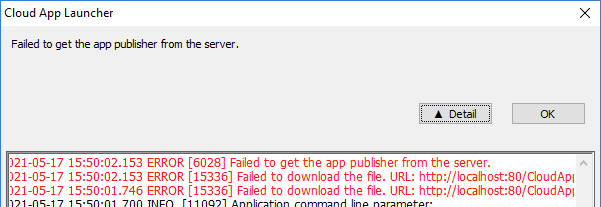
The Cloud App Launcher (CAL) is the client-side component responsible for downloading, installing, and launching the installable cloud app on the user’s desktop. The app executable and supporting files are served from the web server (file server). Errors in this stage mean the launcher itself or the application package cannot be retrieved from the server, preventing the app from starting.
When
After the user accesses the app URL in a browser and the page loads, but the Cloud App Launcher installer (.exe or .msi) or the app config/package file fails to download from the file server.
Symptoms
Error dialogs from the Cloud App Launcher such as “Failed to get the app publisher from the server”, “Failed to download the config file”, “No application was found at the web address”, “Application not found”, or the app executable disappears after installation; specific error codes such as ErrorCode 404, 500, 12029, or 12002 may accompany the message.
💡 Key characteristics to recognize
-
The error appears inside the Cloud App Launcher dialog itself — not in the browser — indicating the browser URL loaded successfully but the launcher failed to retrieve or launch the app.
-
The launcher shows a specific error message such as "Failed to get the app publisher from the server", "Failed to download the config file", or "No application was found at the web address" — each pointing to a retrieval failure between the launcher and the file server.
-
A specific ErrorCode accompanies the message: 404 (resource not found on server), 500 (server-side failure), 12029/12002 (network unreachable or timed out).
-
The app executable disappears shortly after installation completes, with no error shown — this silent removal pattern is characteristic of antivirus quarantine on the client machine.
Example: