Long-running vs. Short-lived Connections
-
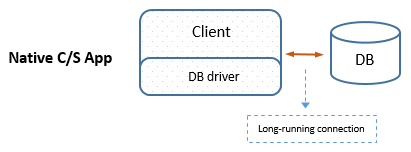
Traditional C/S (Long-running) -- After the
CONNECTstatement is executed, the database connection is established and remains open for the entire lifetime of the application untilDISCONNECTis called or the application exits. For a given client session, all database operations use the same physical connection. -
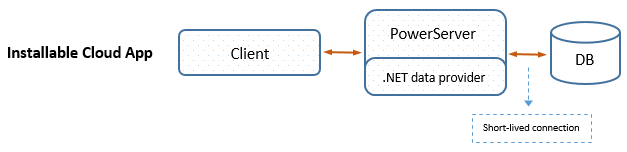
PowerServer (Short-lived) -- Database connections are managed on the server. A physical connection is obtained from the connection pool when a transaction begins and is returned to the pool after the transaction completes. As a result, a single client session may use multiple physical database connections during its lifecycle.
-
Benefits & Limitations -- Short-lived connections improve scalability and concurrency. However, features that depend on persistent connections (such as database temporary tables) may fail because the physical connection -- and thus the table -- is destroyed when returned to the pool. If your application requires persistent connections, you must enable the
LongConnectionDBParm property. For more information, refer to Long connection.
Driver and Credential Management
-
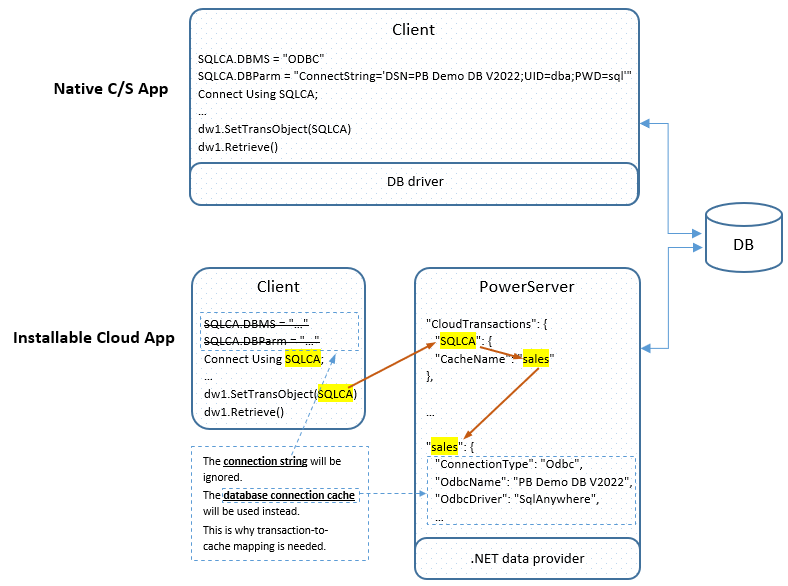
Traditional C/S: Database drivers and sensitive connection strings (including User IDs, passwords etc.) must be installed and stored on each client machine.
-
PowerServer: Data providers (drivers) are installed only on the PowerServer. Connection information is stored securely in a server-side Connection Cache, typically residing within a protected LAN behind a firewall.
Steps to set up a server-side connection cache in PowerServer installable cloud app (for detailed instructions, refer to this section)
-
Create a connection cache
The cache is created in the IDE and used by the IDE to connect with the database and generate C# models; when the application is deployed from the IDE to PowerServer, the cache is also deployed to PowerServer and used by PowerServer to connect with the database at runtime.
-
Map transaction object(s) to the cache.
For each transaction object used in the application, it must be mapped with a cache. This can be done in the PowerServer project painter or in code.
-
Download .NET Core data provider
Unlike the traditional client/server app which connects with the database through a local native driver, the installable cloud app relies on the PowerServer Web APIs and the .NET data provider to connect with the database.
The IDE and PowerServer will automatically download and install the data provider if you have selected to accept the license terms of the provider in the PowerServer project painter.
-