This release introduces a new mechanism for handling multilingual resources in the following runtime modules:
-
PowerBuilder runtime files
-
Cloud App Launcher
Currently, the following runtime module does NOT support multilingual resources:
-
PowerServer Web APIs
The messages returned from PowerServer Web APIs will display in English (for EN version) or Japanese (for JP version).
How to support multilingual resources in PowerBuilder runtime files
Detailed documentations are provided in PowerBuilder's What's New.
How to support multilingual resources in Cloud App Launcher
The Cloud App Launcher now supports multilingual resources.
-
(Installer & Runtime) The launcher automatically uses the client's Windows Display Language for both installation and runtime resources. If the client's Windows display language is not supported, the launcher falls back to English (for EN version) or Japanese (for JP version).
-
Each supported language is stored in a dedicated .lng file (e.g.,
english.lng,french.lng).Supported languages include English, Chinese, Danish, Dutch, French, German, Italian, Norwegian, Spanish, and Swedish.
They will be automatically packaged into the launcher installer.
Do not change the content in these language files. Changes made to them will not take effect.
-
To use the user-defined language file, name the file as
custom.lngand place it in the runtimelangfolder.-
By default, a
custom.lngfile is already provided in thelangfolder (for example, C:\Program Files (x86)\Appeon\Common\PowerBuilder\Runtime 25.1.0.6180\lang). -
Do not change the file name or location of the
custom.lngfile. Only one user-defined language file is allowed. -
Initially, it contains the same content as
english.lngand the text resources of the launcher installer (Text IDs starting with "IDS_INSTALLER_CAL_"). -
Its content format is
Text ID, Text
                                                                 Description
. Modify only the text descriptions. Do not modify the text IDs. -
Back up the
custom.lngfile before modifying its content.
-
-
-
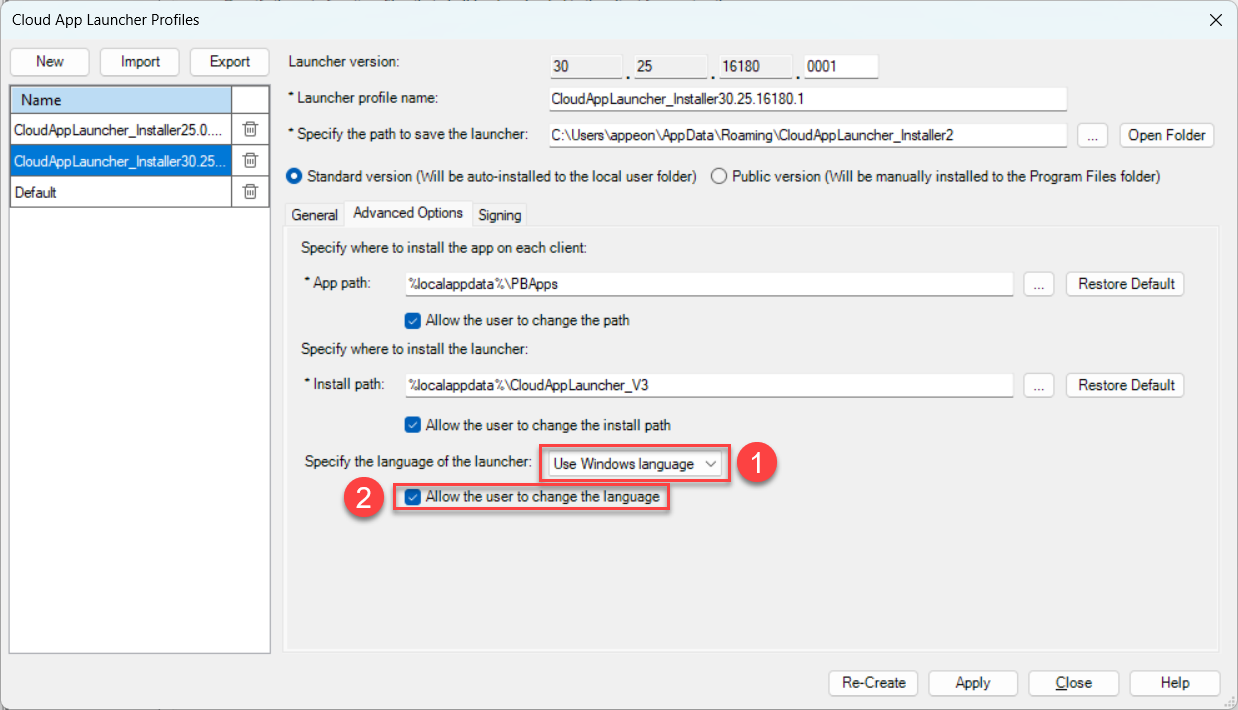
(Installer & Runtime) Developers can specify a language when packaging the launcher, ensuring that both the launcher installer and runtime resources run in the chosen language. (①)
When Use Windows Language is selected, the Windows Display Language configured for the current user on the client will be used.
-
(Runtime only) Developers can also choose to allow the user to change the language for the launcher runtime resources during the launcher installation process. (②)
The end user will be offered with the language option (similar to ①) when installing launcher.