The Azure AD B2C server address must be provided so that the PowerServer Web APIs can use it to validate the token passed from the client. And if validation is successful, it can get data from the database.
Note
The authentication template will be restored if the "Web API authentication" option is changed and the PowerServer C# solution is re-built from the PowerBuilder IDE. Therefore, do not change the "Web API authentication" option if you have made changes to the template in the solution (otherwise changes will be lost).
Note
If you are using ACL-based authorization, you may encounter the following error:
System.UnauthorizedAccessException: IDW10201: Neither scope or roles claim was found in the bearer token.
To avoid this issue, add the following setting in the authentication template file:
"AllowWebApiToBeAuthorizedByACL": true
For more details about ACL-based authorization, refer to the Microsoft documentation: Using ACL-based authorization.
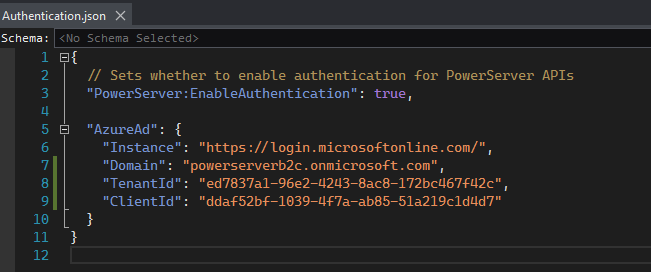
Get the Domain, TenantId and ClientId from Creating an Azure AD B2C tenant, then open the Authentication.json file to modify the authentication template.
"AzureAd": {
    "Instance": "https://login.microsoftonline.com/",
    "Domain": "powerserverb2c.onmicrosoft.com",
    "TenantId": "ed7837a1-96e2-4243-8ac8-172bc467f42c",
    "ClientId": "ddaf52bf-1039-4f7a-ab85-51a219c1d4d7"
  }
Scripts for scenario 3:
"AzureAd": {
    "Instance": "https://powerserverb2c.b2clogin.com/powerserverb2c.onmicrosoft.com/",
    "Domain": "powerserverb2c.onmicrosoft.com",
    "TenantId": "B2C_1_ps2",
    "ClientId": "ddaf52bf-1039-4f7a-ab85-51a219c1d4d7"
  }