

PowerServer Advantages
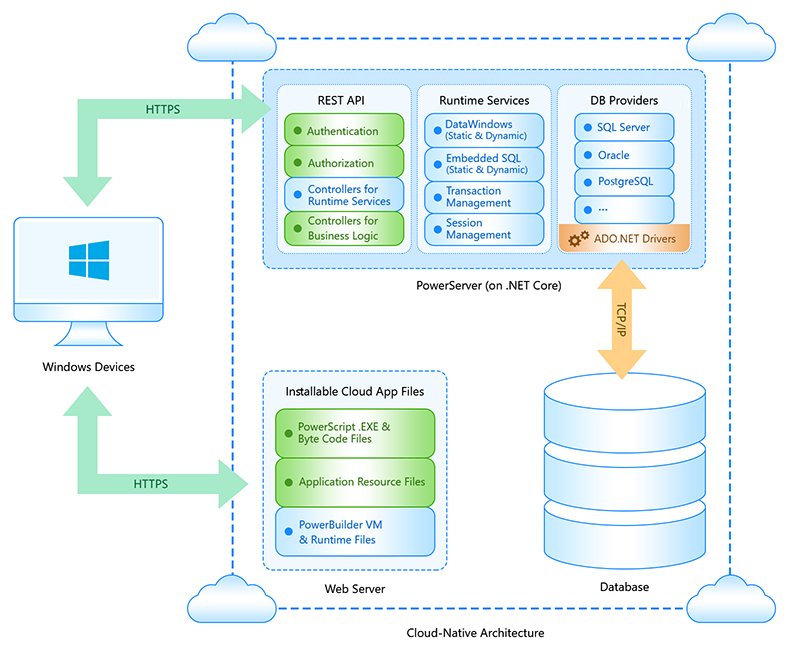
PowerServer allows for the automatic deployment of PowerBuilder projects as "installable cloud apps," which can be installed on desktops or tablets. These cloud apps store their databases and related operations in the cloud (rather than on-premise), with automatic client deployment over the Internet. You can think of "installable cloud apps" as modern desktop applications that require an internet connection for installation and operation.
PowerServer offers the following key advantages:
-
Nearly full feature support for PowerBuilder: PowerServer now supports nearly 100% of PowerBuilder features. PowerServer no longer converts PowerBuilder code to JavaScript (like web apps), but instead uses PowerScript natively (like desktop apps).
-
Installable cloud apps: These are applications that are installed via an internet connection. The app is first installed by accessing the app’s URL in a web browser, after which it operates independently of the browser (e.g., browser type, version, or settings) and can automatically update itself over the Internet.
-
Standardized communication: Communication between the client (desktop) and server is handled through a standard REST/JSON interface. This means you can use any security protocol, such as OAuth 2.0 for user authentication and AES encryption for protecting data.
-
Support for .NET Core: This introduces three major benefits:
-
Cross-platform support (e.g., Linux servers),
-
Improved server-side performance,
-
Cloud-friendly design, including Docker compatibility and side-by-side versioning.
-
How PowerServer Works
-
REST API-based architecture: PowerServer adopts a REST API approach, where the desktop app code interacts with data sources via REST APIs, which can be hosted in either public or private clouds.
-
Load balancing: PowerServer can be configured to balance loads across multiple instances. Each instance hosts both the REST API and data processing functions.
-
Session persistence: In multi-instance scenarios, sticky sessions are used to maintain transaction integrity, ensuring that all requests in a single transaction are handled by the same server instance.
Application Compilation
In traditional PowerBuilder compilation, p-code is generated, and PowerBuilder creates dynamic libraries (PBD files) containing visual objects, DataWindows/DataStores, PowerScript code, and embedded SQL. All PBD files must be installed on the desktop to run the application.
The process for compiling installable cloud apps is different:
-
Server-side data access:
-
DataWindows/DataStores are automatically converted to .NET models and exposed via REST/JSON APIs.
-
Embedded SQL is deployed to the server and exposed via REST/JSON APIs.
-
-
PowerScript and other objects: PowerScript and non-data objects continue to run on the desktop. PowerServer automatically partitions business logic to separate desktop and server-side code.
-
Business logic partitioning: Although partitioning business logic is not mandatory for installable cloud apps, you can reuse or optimize the application’s business logic by converting it to REST/JSON APIs using the .NET DataStore project.
-
Granular p-code files: Unlike traditional monolithic PBD files, PowerBuilder now breaks down PBD files into smaller, individual object/definition files (e.g., .dwo, .apl, .fun, .win, .udo). Each p-code file is uniquely identified, allowing for incremental updates when the user accesses different parts of the app.
Deployment to the Web Server
After compilation, two types of files are deployed to the web server:
-
Granular p-code files: These are broken down from the traditional monolithic PBD format.
-
Application executable and supporting files: Includes resource files, OCX files, and desktop runtime files (e.g., PBVM), similar to client/server PowerBuilder applications.
Note: Although a web server is used for deployment, it functions purely as a file server—no code execution occurs on the web server itself.
Deployment to PowerServer
Two types of files are deployed to PowerServer from DataWindows/DataStores/embedded SQLs:
-
.NET models: Converted from DataWindows/DataStores.
-
SQLs: Compiled with necessary server-side DLLs and published as .NET Core applications (REST APIs).
Client Installation
Installable cloud apps are initially installed via an app URL accessed through a web browser. Once installed, the app no longer depends on the browser (type, version, or settings) and will run independently. The app can also automatically update itself over the Internet.
