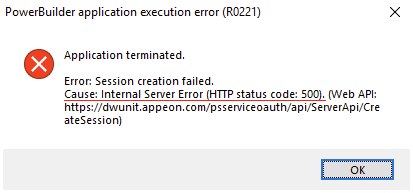
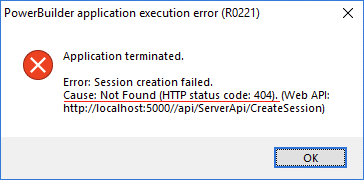
When a PowerServer installable cloud app launches, it immediately creates a session on the PowerServer Web APIs. A session is a server-side context that is dedicated to one running application instance: one app launch = one session created; closing the app = session released. All subsequent HTTP requests from that app instance are tied to this session. If session creation fails — due to network issues, a misconfigured Web API URL, or the Web APIs service not running — the app cannot function at all and a system-level error is shown immediately.
When
Immediately when the app launches and attempts to create a session on the PowerServer Web APIs — before any application window opens. Also occurs mid-session if the network is interrupted or the session times out (session does not exist / session fails to respond).
Symptoms
A “Session creation failed” or “System Error” dialog appears on app launch; HTTP status codes 404, 500, or 503 accompany the message; mid-session errors appear as “Session does not exist” or “Session fails to respond” after a period of inactivity or network interruption; ErrorCode 12029 (failed to connect) or 12002 (timed out) may appear.
💡 Key characteristics to recognize
-
The error appears immediately on app launch, before any application window opens — distinguishing it from errors that occur later during normal use.
-
Each running app instance occupies exactly one session on the server; if multiple users or instances are running and the session limit is reached, new launches fail with "Session not created" — the problem is reproducible under concurrent use but not in isolation.
-
A "Session creation failed" error on launch is distinct from a "Session does not exist" error that appears mid-session — the latter occurs after the app was already running normally, typically following a network interruption or server restart.
-
The same error occurs for all users attempting to launch, not just one specific machine — suggesting a server-side or configuration issue rather than a client-side problem.
Example: