

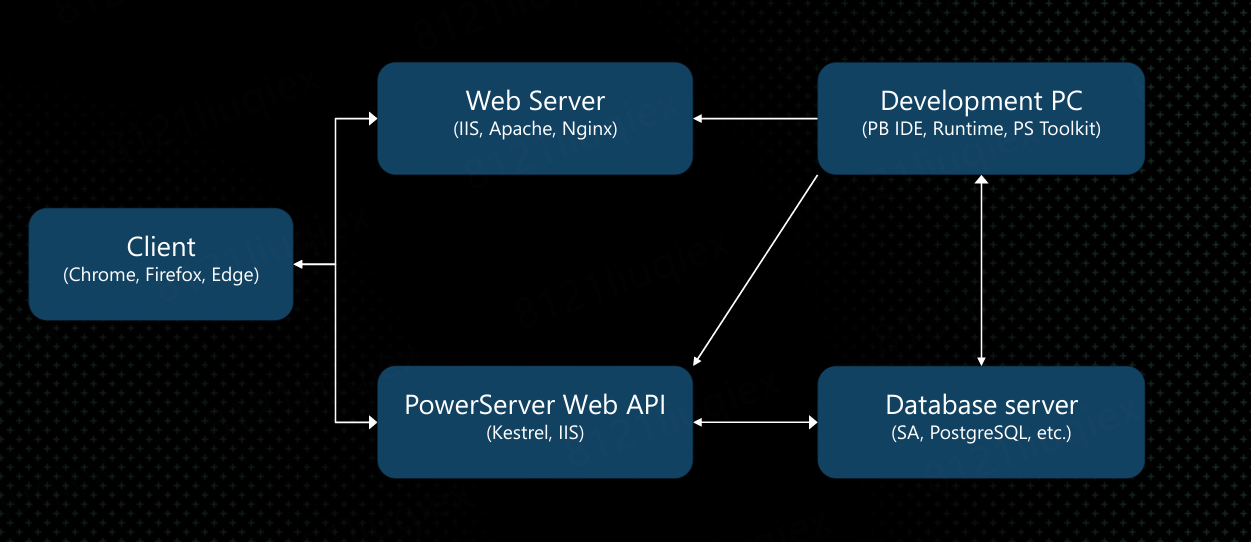
Understanding the PowerServer architecture helps you recognize issue types. A PowerServer deployment spans five key components across the build, server, and client layers. Errors are typically tied to one of them:
|
Issue Type |
Typical Symptoms |
Detection |
|
Development PC |
PowerBuilder IDE with PowerServer Toolkit plug-in and PowerServer NuGet packages — where the application is analyzed, compiled, and deployed |
Build & Deploy stage |
|
Web Server |
IIS, Apache, or Nginx — functions purely as a static file server; serves granular p-code files and app resources to clients (no code execution occurs here) |
Install/Access stage |
|
PowerServer Web API (.NET Server) |
Kestrel or IIS-hosted API layer — handles business logic and data exchange |
Runtime stage/Access stage |
|
Database Server |
SQL Anywhere, PostgreSQL, etc. — stores and retrieves application data |
Runtime stage |
|
Client |
Installable cloud app running on the desktop — initially installed via browser URL, then runs independently of the browser (type, version, or settings); auto-updates over the Internet |
Install & Run stage |
When an error occurs, quickly identifying which component is involved narrows down the possible causes significantly. Note that the Web Server acts purely as a static file server in this architecture; runtime logic errors will trace back to the PowerServer Web APIs or the database, not the web server itself.
