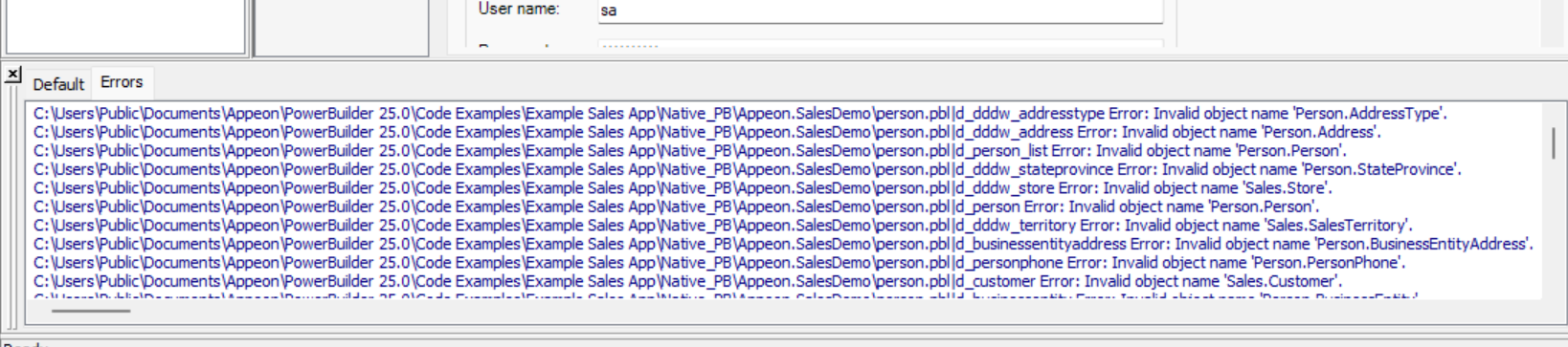
During the build process, the PowerServer Toolkit automatically converts each DataWindow control and DataStore object in the application into a PowerServer C# model, stored in the PowerServer C# solution > “AppModels” project > [appname] > “Models” folder. Each model represents one DataWindow and maps its table schema, column types, and SQL to .NET equivalents. If the conversion fails — for example, due to an unsupported SQL construct, a missing database connection during build, or a data type that cannot be mapped — the build will report an error and the DataWindow will not function correctly at runtime.
When
During the Build & Deploy process, when the PowerServer Toolkit attempts to convert each DataWindow object to a C# model. A database connection to the source database is required at build time for this conversion to succeed.
Symptoms
Build output shows errors such as “Invalid object name ‘xxx’” or “The string ‘xxx’ was not recognized as a valid DateTime”; the C# model for the DataWindow is not generated or is generated incorrectly; at runtime the affected DataWindow may display blank, return no data, or throw a data-type mapping error.
💡 Key characteristics to recognize
-
The build output window shows errors referencing specific DataWindow names or table/column names that failed to convert to C# models.
-
Each DataWindow is converted independently — one failing conversion does not block others, but the affected DataWindow will not work at runtime.
-
A valid connection to the source database is required during the build process so that PowerServer can retrieve database metadata and accurately generate the corresponding C# models; a missing or misconfigured database connection at build time is a common cause of this error.
-
Check the generated C# model file in the AppModels project to verify that the DataWindow object was correctly translated; if the C# model file is missing, the conversion has failed.
Example: