

In PowerBuilder IDE, you can export the menu into an XML file that can be used directly to build the RibbonBar:
-
If you right-click the root node of the menu, you can export the entire Menu into a RibbonBar in the XML format. Note that this file does not include the QuickAccessToolbar.
-
If you right-click on the first-level node under the root node, the MenuItem will be exported to a Ribbon Category in the XML format. This file can be used with the ReplaceCategoryByXML method.
-
Currently, exporting other levels of MenuItem to XML files is not supported.
Note
If the menu is created dynamically at runtime, it cannot be exported to XML.
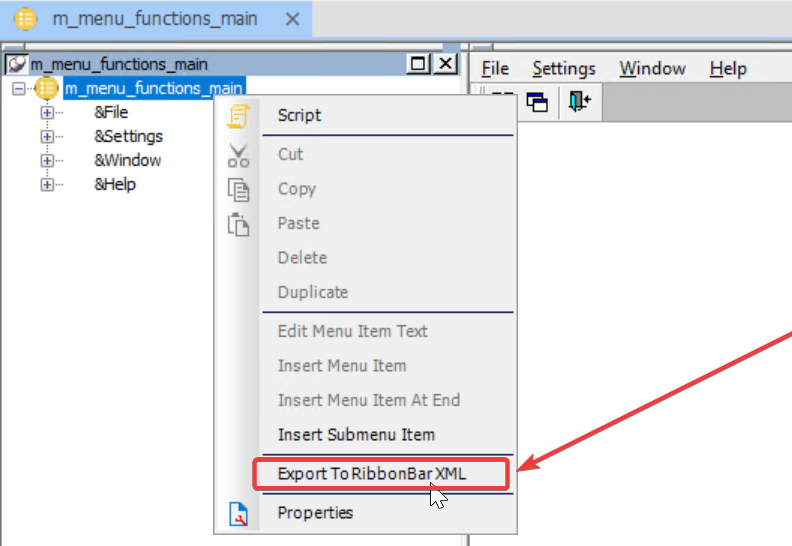
After you export the menu to the XML file, you can customize the file and then load this customized ribbon bar in the MenuChanged event.
Here are the complete steps for how to do that:
-
Export the menu to an XML file by right-clicking the menu object in the PowerBuilder system tree, and then selecting Export To RibbonBar XML.
-
Open the RibbonBar Builder by selecting the Tools > RibbonBar Builder menu from the PowerBuilder IDE, and then load the exported XML file to the RibbonBar Builder by selecting the Open File menu.
-
In the RibbonBar Builder, customize the ribbon bar by changing the scripts in the XML file and previewing the result. Save the XML file when finishing customization.
-
Load the customized ribbon bar via the ImportFromXMLFile function in the MenuChanged event.
