

After installing newer versions of the .NET Runtime (such as .NET 8 or .NET 10), older versions of PowerBuilder (for example, PB 2022 R2 which supports .NET 6) may encounter issues such as login errors (e.g., "Invalid parameter from the client side") or the IDE failing to launch (process visible in Task Manager only).
Cause:
PowerBuilder IDE relies on specific versions of the .NET Runtime for certain functionality (for example, PB 2025 R2 supports .NET 10, PB 2025 and 2022 R3 supports .NET 8, PB 2022 R2 supports .NET 6). Therefore, changes in installed .NET versions - whether installed manually or introduced by other software - can directly affect PowerBuilder's behavior and lead to compatibility issues.
Solution 1:
Modify the configuration file to ensure compatibility with the installed .NET version.
1. Find the pbdevproxy.runtimeconfig.json file in the IDE installation folder (typically C:\Program Files (x86)\Appeon\PowerBuilder [version]\IDE for PowerBuilder, or C:\Program Files (x86)\Appeon\InfoMaker [version]\IDE for InfoMaker).
2. Comment out the following line in this file.
//"rollForward": "LatestMajor",
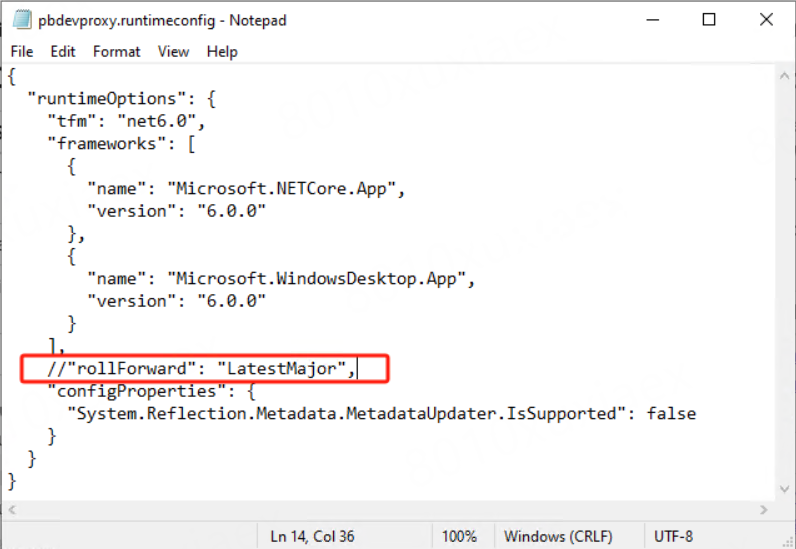
3. Restart IDE.
Solution 2:
Upgrade to a PowerBuilder version that supports the installed .NET Runtime (for example, PB 2022 R3, which supports .NET 8, or PB 2025 R2, which supports .NET 10).
