This release enhances support for SQL Server datetime2, ensuring consistent handling of high-precision datetime values (up to 7 fractional seconds) across DataWindow, runtime, and the debugger.
-
Support
datetime2data type when creating a SQL Server database table in the Database painter. -
DataWindow
Updatewith parameter binding on datetime columns now works correctly with SQL Serverdatetime2, avoiding mismatches that could previously cause update failures. -
DataWindow
datetime/timedata type supports values up to 7 fractional seconds precision; anddatetimecolumns can display and handle 7-digit fractional seconds. -
The debugger shows values up to 7 fractional seconds precision.
-
The following functions support up to 7 fractional seconds precision:
-
DataWindow functions:
GetItemDateTime,GetItemTime,GetDataValue, etc. -
JsonParser functions:
GetItemDateTime,GetItemTime -
Graph functions:
AddData,DeleteCategory,FindCategory, etc. -
EditMask functions:
GetData -
DatePicker functions:
SetValue -
DynamicDescriptionArea functions:
GetDynamicDateTime,GetDynamicTime,SetDynamicParm -
System functions:
DateTime,Time,Hour,IsTime, etc.
-
Please notice the following when upgrading the application:
-
Time() syntax changes
To align with the 7 fractional seconds precision, the syntax for
Time()has changed fromTime (int h, int m, int s, int u)To
Time (int h, int m, int s, long u)And zeros ("0") will be added to the beginning of fractional seconds to reach 7 digits, for example,
tt = time(10, 11, 12, 123456)
//returns value: 10:11:12.0123456

tt = time(10, 11, 12, 1)
//returns value: 10:11:12.0000001
-
PSR file incompatibility issue
After datetime values support 7-digit fractional seconds, the value of fractional seconds will change when using PSR files exported from previous InfoMaker versions. For example, 003450 will become 000345.
To avoid incompatibility issues, please use the PSR file generated by 2025 R2 (do not use PSR files generated by 2025 or earlier versions).
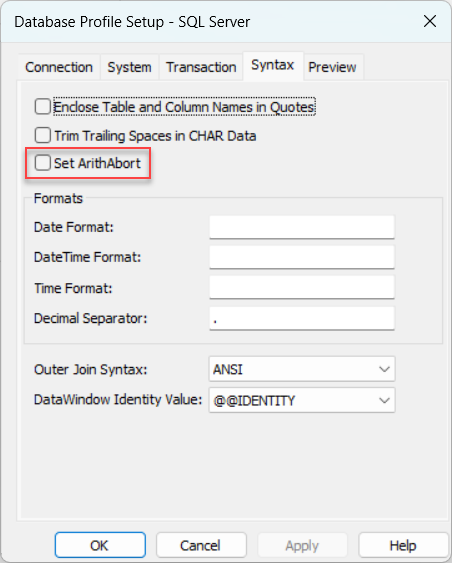
Query performance can degrade when application sessions use
ARITHABORT OFF and numeric types do not match.
To address this, a new option, "Set ArithAbort", is added to the Database Profile Setup dialog box, along with a corresponding database parameter, ArithAbort (1 = ON, 0 = OFF).
This allows developers to explicitly control the ARITHABORT setting through the UI or in scripts. By default, this option is not specified, meaning its behavior depends on the client environment.
According to Microsoft official documentation, always set ARITHABORT to ON in your logon sessions. Setting ARITHABORT to OFF can negatively impact query optimization, leading to performance issues.
This option is only available for MSOLEDBSQL SQL Server and ADO.Net SQL Server.
MSOLEDBSQL SQL Server:
SQLCA.DBMS = "MSOLEDBSQL SQL Server"
SQLCA.AutoCommit = False
SQLCA.DBParm = "ArithAbort=1"
ADO.Net SQL Server:
SQLCA.DBMS = "ADO.Net"
SQLCA.AutoCommit = False
SQLCA.DBParm = "Provider='SQL Server',ArithAbort=1"